
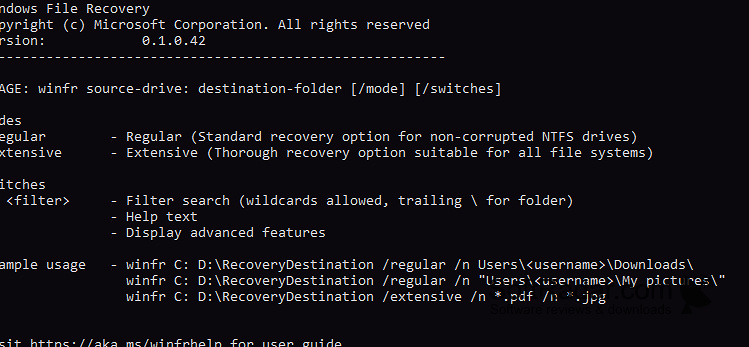
Windows File Recovery is a command-line utility from Microsoft designed for Windows systems. Version 1.53 helps users restore accidentally deleted files from local storage drives, including hard disks and solid-state drives, by scanning for recoverable data. It supports various file systems and offers different recovery modes to improve the chances of retrieving lost content after deletion or formatting.
| Recovery mode | Best for | File system support | Typical success factors |
|---|---|---|---|
| Default | Recently deleted files on healthy NTFS volumes | NTFS | Minimal disk writes after deletion; intact MFT entries |
| Segment | Fragmented or partially overwritten NTFS data | NTFS | Contiguous clusters still readable; limited free-space reuse |
| Signature | Known file-type headers when metadata is gone | NTFS, FAT, exFAT, ReFS | Recognizable magic bytes; less reliable for heavily modified formats |
| Extensive | Deep scan after failed lighter modes | NTFS, FAT, exFAT | Time-consuming full-volume pass; higher chance on large free regions |
| Windows File Recovery 1.53 (Microsoft) — Windows console utility; results depend on overwrite state and must target a different drive than the source | |||
Pros
- Official Microsoft tool ensuring reliability and compatibility with Windows
- Free to download and use from the Microsoft Store
- Supports recovery of deleted files from various file systems including NTFS
- Command-line interface allows precise control over recovery operations
- Regularly updated by Microsoft for improved performance and security
Cons
- Command-line interface only, which can be difficult for non-technical users
- Recovery success depends heavily on how soon you run it after deletion and whether data was overwritten
- Limited to local NTFS/FAT/exFAT drives and does not support network or cloud locations
Download