
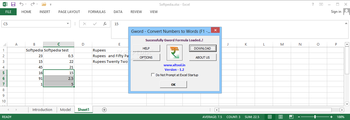
Gword is a Windows utility from XLTOOL that works with Microsoft Excel to turn numeric values into their written word equivalents. It is designed for users who need to convert figures into text form directly within spreadsheets, supporting everyday tasks such as preparing financial documents or reports. The program runs on the Windows operating system and focuses on straightforward number-to-words conversion inside Excel.
| Gword Product Brief | ||
|---|---|---|
| XLTOOL release | Gword – Excel Convert Numbers to Words | Windows desktop utility |
| Turns numeric cell values into spelled-out text inside Excel workbooks | ||
| Primary job | Number-to-words conversion | Supports everyday spreadsheet amounts |
| Platform focus | Built for Windows Excel users who need readable word forms of figures | |
| Developer note | XLTOOL | Specialty Excel add-on tooling |
Pros
- Converts numbers to words directly inside Excel spreadsheets
- Useful for invoices checks and financial documents needing written amounts
- Runs natively on Windows
- Simplifies a common manual task for Excel users
- Provided by XLTOOL as a dedicated conversion utility
Cons
- Only available on Windows
- Requires Microsoft Excel to be installed and used
- Functionality is limited to converting numbers into words
Download