
FPT (Intel Flash Programming Tool) is Intel’s official command-line utility for reading, writing, and verifying SPI flash memory containing UEFI firmware. Part of the Intel ME System Tools package, FPT operates directly through the ME interface to access all flash regions including BIOS, ME, GbE, and Descriptor. 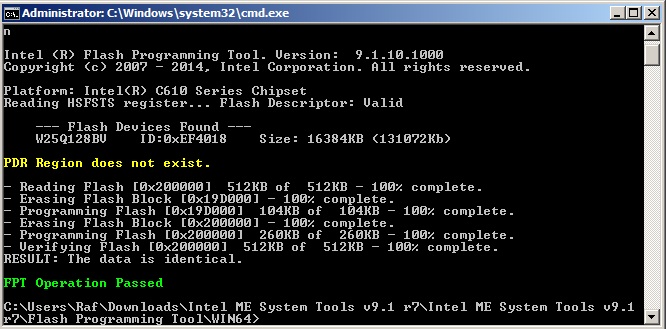
| Category | Details | Notes & Tips |
|---|---|---|
| Full Name | Intel Flash Programming Tool | Part of Intel ME System Tools package |
| Latest Versions | FPTw.exe (Windows) FPTw64.exe (Windows 64-bit) fpt (Linux) | Always match version to your ME firmware! |
| Primary Functions | • Read SPI flash contents • Write firmware regions • Verify flash integrity • Erase specific regions | Works even when BIOS flashback fails |
| Key Commands | -d backup.bin (dump entire chip) -bios -d bios.bin (BIOS region only) -me -d me.bin (ME region) -f firmware.bin (flash entire chip) -greset (global reset after flash) | Always backup with -d first! I learned this the hard way |
| Flash Regions | • Descriptor (FD) • BIOS/UEFI • Intel ME • GbE (Gigabit Ethernet) • Platform Data (PDR) | Descriptor controls access permissions |
| Common Errors | Error 7: Region locked Error 26: Wrong FPT version Error 280: ME in recovery mode | Error 7 needs unlocked descriptor or pinmod |
| Required Access | • Administrator/root privileges • Intel ME Interface driver • Unlocked flash descriptor (for write) | Disable Windows Driver Signature first |
| Safety Commands | -i (show flash info) -verify (verify after write) -noverify (skip verification) | Never use -noverify unless absolutely necessary |
| Advanced Options | -rewrite (force overwrite) -address 0xXXXXXX (specific offset) -length 0xXXXX (partial read/write) | -rewrite bypasses same-content check |
| Platform Support | Intel 6-series through latest Desktop, laptop, server boards Some ARM platforms with Intel NICs | Older platforms use FPT v1-v8, newer use v9+ |
| Recovery Uses | • Failed BIOS updates • Clearing NVRAM • ME region repair • MAC address restore | Saved many “bricked” boards with this |
| File Formats | .bin (raw dumps) .rom (BIOS images) .cap (encapsulated UEFI) | FPT needs raw .bin, not .cap files |
| GUI Alternatives | • Intel FIT (OEM tool) • GUIfptw64 (community) • ME Analyzer (read-only) | GUIs are easier but FPT is more reliable |
| Best Practices | 1. Always backup first 2. Verify ME version match 3. Use stable power (UPS) 4. Don’t interrupt process | Keep multiple backups on different drives |